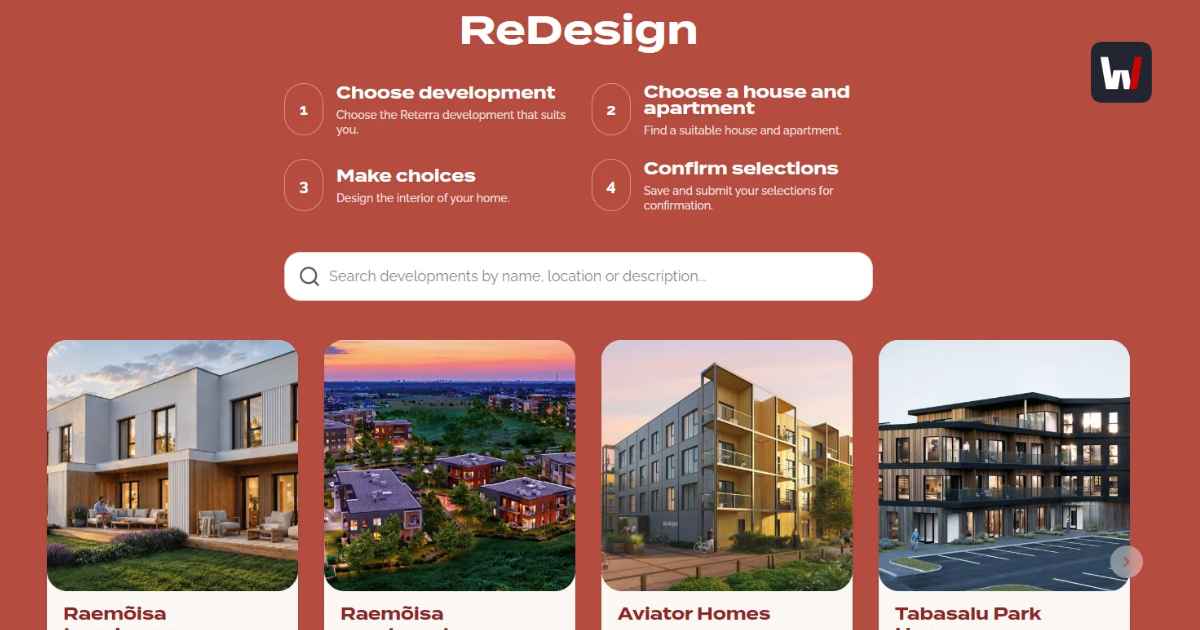
The best apartment configurator does 3 things well. It covers everything from the first choice to the handover. It's clear and easy for buyers and your team. And it fits every new building. Below we compare 6 tools on exactly that.
Why is Wabric writing about apartments? Because an apartment is a configurable product too, just like a garage door or a glass railing. Every buyer in a new development picks their own kitchen and bathroom, down to the tiles, the sink and the taps. That's exactly what a configurator is for.
You are probably here because Excel is losing the fight. Every buyer wants a different tile, floor or layout. Every change goes through email. Then someone in your office retypes every choice and makes a file for the builders at the end. Let's fix that.
A good configurator takes that whole mess off your plate.
Short on time? Here is how our apartment configurator for real estate developers works.
Key Takeaways
- An apartment configurator lets buyers choose their finishes online and sends their choices to the builder as clean lists. Buyers want it: in a UK survey, only 11% of new-build buyers could personalise their home the way they wanted.
- Judge each tool on 3 things: does it cover everything from the first choice to the handover, is it easy for buyers and your team to use, and does it fit every new building. Then check setup time and price.
- Watch the pricing model. Fees per apartment, project or user grow with every building you sell. A flat fee doesn't.
What is an apartment configurator?
An apartment configurator is software that lets home buyers choose their interior finishes online: floors, tiles, doors, kitchen fronts and more. The developer sets the options, rules and prices. The buyer picks. The builder gets a list of what goes into which apartment.
It goes by many names. In English you'll also see home configurator, interior configurator or material configurator. UK housebuilders talk about options and upgrades. In Germany and Austria it's Bemusterung and Sonderwünsche. In the Netherlands, meer- en minderwerk. In France, TMA. In Sweden, tillval. Same job everywhere.
Why do real estate developers need an apartment configurator?
Because buyers want choice, and handling it by hand is slow, expensive and easy to get wrong. Here's what that looks like.
- Buyers want more choice than they get. In a UK survey of 503 recent new-build buyers, only 11% could personalise their home the way they wanted before moving in. 49% paid for more changes after moving in, and 32% spent over £5,000. Much of that could have been an upgrade sale.
- Errors on site are expensive. Avoidable errors cost UK construction around 21% of project value, according to the Get It Right Initiative. A wrong tile in the wrong apartment is one of them.
- The manual work eats a full-time role. Before its configurator, Estonian real estate developer Reterra needed 1 full-time employee just to compile finishing lists for builders, apartment by apartment. That's about €5,000 a month.
- Wrong quantities cost money. Someone has to work out how many tiles or how much parquet each apartment needs, based on what the buyer chose. Order too much and the leftovers are a cost. Order too little and the builders wait for the next delivery.
What should you look for in an apartment configurator?
Start from your problems, not from a feature list. Developers usually want the same things: less manual work, fewer errors on site, faster buyer decisions and more upgrades sold.
Functionality: does it cover everything from the first choice to the handover?
Picking finishes is only the start. Someone still has to check the choices against your rules, price them and send clean lists to the builder. Look for rules that block impossible combinations, live prices, quantities that calculate themselves, a builder export you can use as it is, and support from the sale all the way to the handover.
Ease of use: is it easy for buyers and for your team?
There are 2 groups to please. Buyers need to see their own rooms with their own choices, fast, on any device. Real-time 3D sounds great, but slow, cartoon-like 3D can hurt more than it helps. We've seen it switched off on live projects.
Your interior coordinators, sales team and architects work in the back office every week. They add a tile, change a price, close a deadline. If the back office is hard to use, or every change needs a support ticket, you pay in hours and patience.
Flexibility: does it fit every new building?
No 2 buildings are the same. Ask if rules can cover the whole apartment or go room by room. Ask about different ceiling heights, accent walls and kitchen changes. If you build in more than 1 country, ask about languages, currencies and VAT. Then ask what happens when you need something the tool can't do yet: who builds it, how fast and at what cost.
Setup: how long does each new project take?
Ask how a new building goes from floor plans to a live configurator, and who does the work. Some tools need BIM models. Some need the vendor's team for every project. Then ask how many errors your team will fix afterwards. Slow setup with wrong data is one of the first things developers mention when they want to switch.
Price: how does it grow with you?
Check what the price is tied to: apartments, projects, users or nothing. A fee per apartment looks small on 1 building. Now multiply it by every apartment you plan to sell in the next 3 years.
What are the best apartment configurators in 2026?
The main options in 2026 are Wabric, GBuilder, Interior Mode, PROPSTER, Woonmodule and Habiteo. Here's each one in plain words:
Wabric
Wabric is the Europe-based configurator and product data platform we build at Wenture. For developers, it connects the sale to the building site, from the first choice to the handover.

What it covers. Buyers pick finishes within your rules and see live prices with VAT, while your team sees net prices. Quantities calculate themselves: square metres from floor and wall sizes, skirting from the room's perimeter. So you order what buyers actually chose, not a guess. Buyers get a PDF of their choices. Builders get an Excel file in 1 click, with a sheet per building, a row per apartment and a column per product. Unsold apartments get sample choices, so the file is always complete.
Easy for buyers. Buyers see their choices layered onto images of their actual rooms. We picked images over real-time 3D on purpose: they're fast, cheaper to build and just as sharp on a phone. Buyers start from a link on your price list without logging in. They sign in with email, Google or Apple when they save or send. They can share a link with a co-buyer and go back to an earlier version.
Easy for your team. You set things up by project, building, floor and apartment type, with templates for apartments, rooms and kitchens. Change a template once and every linked apartment follows. New products, prices and rules go live the moment you save them. At Reterra, changes that used to take months through outside partners now take minutes.
Flexible. Rules can cover the whole apartment, like the same parquet and doors in every room, or go room by room. They handle either-or choices, like a bathtub or a shower wall, and grey out options that don't fit. Ceiling heights and accent walls are covered, and finishing and kitchen choices can lock on different dates. Several languages, currencies and VAT rates work in 1 setup. When you need something new, our own developers build it.
Fast to set up. Each new project starts from your PDF floor plans. AI finds the apartments and rooms, your project manager checks and corrects a preview, and the structure builds itself. No BIM models or CAD files needed. A new project goes live in hours, not weeks.
In your brand colours. It uses your logo, colours and fonts, so it feels like part of your own website. Reterra's buyers know it as Reterra ReDesign.
Proof. Reterra ran its finishing choices in a WordPress tool and big Excel files, and every change went through outside partners. It's one of Estonia's largest developers, with close to 1,000 homes since 2015. Now it runs Wabric under its own brand as Reterra ReDesign. The builder export alone replaced a full-time role, worth about €60,000 a year. Read the Reterra story or try the live configurator.
Best for: developers who want buyers to see their own rooms, new projects live in hours, a back office their own team runs and a price that doesn't grow with every apartment.
GBuilder

GBuilder calls itself a BIM-based customer journey platform for real estate. It covers the buyer journey from sales to aftercare. Buyers see a 3D model of their own apartment with their chosen materials.
Good fit if: you're a large developer who already works in BIM. Watch out for: it runs on BIM models, so every project needs one, made by your team or by GBuilder.
Interior Mode

Interior Mode (Kodukujundaja on Liven's own projects) is a home designer built by Estonian developer Liven, now sold to other developers too. Buyers choose materials room by room and see them in 3D images. It calculates quantities and costs and makes Excel files for the builder.
Good fit if: you have a few smaller projects and want a quick start. Watch out for: you pay for every active apartment, every month, so the price grows with every apartment you sell.
PROPSTER

PROPSTER is a customer platform for property companies. It started as a tool for Sonderwünsche, buyers' special requests. Today it has 4 modules: a buyer portal, sampling and special requests, documents and communication, and handover with defect management.
The configurator can run under the developer's own brand.
Good fit if: special requests are your main headache. Watch out for: its own blog describes buyers choosing from 4 to 8 options per category, set in advance.
Woonmodule

Woonmodule has built online sales tools for new-build housing since 2008. Its home configurator lets buyers pick floor plans, options and finishes with live prices and a 3D view. It plugs into Dutch real estate CRMs like NieuwbouwOffice, HoomCtrl and RealWorks.
It also has an AI Configurator: upload an option list as a PDF and AI turns it into a configurator. That version shows options and prices, not 2D or 3D plans. Around it sit a home finder, a CRM, digital purchase agreements and a buyer portal.
Good fit if: you want a home finder, a CRM and a configurator from 1 supplier. Watch out for: Woonmodule's team sets up the full configurator, and the faster AI version shows only options and prices, with no plans.
Habiteo

Habiteo makes 3D marketing tools for new-build housing, including a 3D configurator. Buyers move room by room, pick a mood theme and choose materials from your catalogue, with prices. The summary goes to your team and to the buyer as a quote.
Good fit if: you want 3D marketing visuals with a configurator on top. Watch out for: packages start from a model apartment repeated for each apartment type, so ask what your buyers will actually see.
What should you check before switching apartment configurators?
If your current configurator isn't working, you're not alone. When developers tell us why they want to switch, we hear the same 6 reasons:
- Every new project takes weeks to set up, and the data still needs checking line by line.
- Coordinators and architects find the back office hard to use, so changes pile up.
- The 3D view looks like a cartoon, not a real home, so buyers ignore it or you switch it off.
- The fees grow with every apartment.
- The tool doesn't get new updates or features anymore.
- The builder's file is still made by hand. At Reterra, that took a full-time employee until the export was automated.
Before you switch, sort out 3 things:
- Your data. Ask how buyers' choices, product lists and prices move to the new tool.
- Your timing. Start the new tool on your next project, not on one that's already selling.
- Your people. Let the coordinators who'll use the back office every day try it before you sign.
Summary
Pick the one that fixes your problems: the manual work, the errors and the back-and-forth with buyers.
The right tool automates most of the manual work: the retyping, the counting and the builder's file. At Reterra, ReDesign, built on Wabric, took over a job that used to need a full-time employee.
Your buyers already choose everything else online. Their tiles can be next.
Frequently Asked Questions
Yes. Home configurator, interior configurator and material configurator all mean the same thing: a tool where buyers choose finishes and options online.
It depends on the tool and on how custom you go. Ask for 2 numbers: the first setup, and every new project after it. With Wabric, AI reads each new project's PDF floor plans, and the project goes live in hours.
No. Some tools, like GBuilder, run on BIM models and can make them for you. Others start from floor plans or an option list. Wabric needs only PDF floor plans.
Yes. Wabric is built for developers who want buyers to see their own rooms, new projects live in hours and a flat monthly fee. Unlike GBuilder, it doesn't need BIM models: PDF floor plans are enough, and your own team runs the back office.
Most tools export them. Check that the format matches what your builder works with. Wabric creates an Excel file with 1 row per apartment and every room's choices and extra prices.
Only if it handles different languages, currencies and VAT rates. Wabric handles all 3 in 1 setup.